 ARMF
ARMFForex risk management software
Risk management software does not make the decision for the trader: it removes arithmetic and forgetfulness from a process where both cost money. Below are twelve tools sorted into six classes, with an honest list of what each class calculates itself and what is left to you. The order of the review runs from the terminal, where a trade is executed, to the spreadsheet, where the rules are written in words.
Six classes of tools and what each one solves
The confusion in choosing software usually starts when tools of different classes are compared with each other: a terminal with a journal, an advisor with a web service. They do not compete but cover different parts of one chain — from the size calculation to the conclusion about whether the system works.
The place of execution: it accepts an order with a stop, reserves margin, shows its level and stores the history. It does the currency arithmetic precisely, but the risk percentage is not built into it.
MetaTrader, cTraderAdvisors, scripts and panels: they convert the percentage into lots, place the stop together with the entry and block trading after the daily limit. They work only while the terminal is open.
advisors, FX BlueIt reads the account history and calculates statistics from it: the drawdown by equity, expectancy, the spread. It sees the result but not the intent of the trade — the markup by setup is entered by you.
Myfxbook, journalsExcel or Google Sheets: the rules and formulas in your own wording. Slower than automation, but transparent and verifiable — every figure can be broken into its factors.
Excel, SheetsRunning the rules over past quotes in accelerated time. It gives statistics before they start costing money, but the result in it is always better than the real one.
Forex Tester, Soft4FXThey do not calculate risk but provide the conditions for the rest: a server keeps the terminal running, a calendar shows the minutes when order execution is worse than usual.
VPS, calendarTwelve programs and services for a forex trader
The services for a forex trader are listed not by popularity but by their place in the chain of decisions. Each card has two fields that matter more than the description: what the tool covers and what it does not — the second usually decides how many programs you will have to keep at once.
The workplace of most forex accounts: an order with a stop, the required margin, the margin level and an export of the trade history. It counts money but does not know your risk percentage — the size you enter yourself.
Programs inside the terminal: they convert the risk percentage into lots, place the stop together with the entry and close the day when the loss limit is reached. This is code, and its behaviour has to be checked on a demo.
The second common terminal of forex brokers. The size is set in lots or units of the base currency, the cost of the stop is visible before the order is sent, and algorithms are written in C# in cTrader Automate.
The place where a trade is planned before the order: the long position tool works out the R/R and the size for a set percentage, and alerts remove the need to sit at the screen. Execution is on the broker's side.
Connects to the account and calculates what the terminal shows piecemeal: the drawdown by equity, expectancy, the distribution of results. Plus a set of calculators and an economic calendar.
A family of add-ons to MetaTrader given away for free: a review of closed trades by the worst excursion inside the position, panels for faster order entry and a simulator of manual trading on past quotes.
A portfolio of several robots and signals on one account: each strategy has its own share of equity and its own loss limit, and weak segments of the statistics are switched off from copying. The deposit stays where it was.
Edgewonk, TraderVue, TradeZella, TraderSync and their analogues: importing trades, markup by setup and by mistake, statistics in R. They answer the question of which part of the system brings money and which loses it.
Forex Tester, Soft4FX and the built-in MetaTrader tester: running the rules over historical quotes in accelerated time. A hundred trades accumulate in an evening rather than in half a year — and they cost nothing.
The only tool where the rules are written in your own words and checked by formula: the size, the money risk, the drawdown by equity, the expectancy in R. It costs nothing and does not depend on somebody else's service.
A list of releases and speeches with an importance rating. It calculates nothing but shows the minutes in which the spread widens and a stop fills worse than the level stated.
A remote computer on which the terminal runs around the clock. Needed where a program stands between you and a loss: a daily limiter, a trailing stop utility or a trading advisor.
The access model is stated as of the date of the data check and may change: developers change tariffs, free limits and the set of functions without warning. Check on the developer's site.
Which risk management task each class covers
The table answers the question this section was written for: how many programs you need to keep in order to cover the whole of risk management. The answer is usually two or three tools rather than one — and that is normal.
| Task | Terminal | An add-on | An external service | Your own spreadsheet |
|---|---|---|---|---|
| The size in lots for a set percentage | no | yes | with a calculator | yes |
| The pip value for a cross pair | in the specification | yes | with a calculator | by formula |
| The required margin before the order is sent | yes | yes | with a calculator | by formula |
| The stop placed together with the entry | manually | yes | no | no |
| Blocking trading after the daily limit | no | yes | no | on discipline |
| Spread, commission and swap in the result | in the report | partly | yes | if you enter them |
| The maximum drawdown by equity | in the report | no | yes | by formula |
| The expectancy of a trade in units of risk | no | no | yes | yes |
| Statistics by entry type | no | no | in journals | yes |
| Checking a rule on historical quotes | in the tester | in the simulator | no | no |
Training tools and infrastructure do not appear in the table: the first do not work on a live account, the second do not calculate risk but keep the rest running.
There are almost no empty cells in the «Your own spreadsheet» column, and that is not a coincidence: a spreadsheet repeats any formula but cannot intervene in the trading. The reverse is true for an advisor — it intervenes but explains nothing.
An online trader's calculator or a program: what to choose for the task
An online trader's calculator solves a one-off task in ten seconds and needs no installation; a program inside the terminal solves the same task continuously and without your involvement. Choose a task on the left — the answer appears on the right: what covers it and what will still be left undone.
The size in lots for a risk percentage
The task appears before every order and is solved by arithmetic: the risk amount is divided by the stop distance in pips and the pip value per lot. An error here costs more than any other because it is multiplied across every trade in a row.
What is left to you: the stop distance. No tool knows where exactly your idea stops working.
The required margin and the margin level
The terminal reserves collateral for a position and shows the margin level in percent. While the level is high a stop-out is not a threat; when it falls to the broker's threshold the positions are closed by force and not where you planned.
What is left to you: the total margin across all open positions. Each one on its own looks harmless.
Stopping after the loss limit
The rule about a daily loss ceiling is broken more often than any other, because it is broken at the moment when reasoning is hard. A program does not argue and does not persuade: it closes the positions and cancels the pending orders.
What is left to you: the decision not to reinstall the advisor the same evening. Technically it takes two clicks.
The depth and duration of a drawdown
Drawdown is counted by equity rather than by balance: the balance curve does not see a floating loss and draws a pretty line where the account has already sunk. An external service draws both curves and shows the divergence.
What is left to you: the conclusion. The drawdown figure changes nothing until it turns into a revision of the risk share.
Statistics by entry type
The overall profitability of an account hides the structure: usually one group of trades feeds you while another quietly eats what was earned. They can be separated only by markup entered by the trader — the service itself does not know how the entries differed.
What is left to you: the honesty of the markup. In hindsight a setup is remembered in a way that flatters you.
Running the rules over history
Any change of the rules is a new system, and its statistics are unknown. A simulator gives a hundred trades in an evening instead of half a year of real trading and costs nothing in money, although it does not reproduce the emotions.
What is left to you: the discipline of the run. Clicking past an unsuccessful stretch of history in a simulator costs nothing, and that is exactly how a sample gets spoiled.
How to assemble a set of tools for yourself
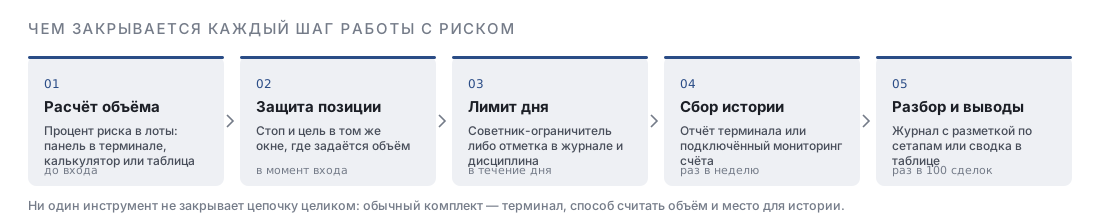
What should be assembled is not the «best» tools but the minimum set that covers the whole chain. The five steps below are ordered by the cost of a mistake: the first point is the most expensive one to get wrong.
One tool always at hand at the moment of the order: a utility in the terminal, a calculator tab or a row in a spreadsheet.
compulsoryA mechanism that stops trading after the loss limit. An advisor does it without discussion, a note in the journal only with your help.
compulsoryAn export of trades from the terminal or connected monitoring: without history any conclusion about the system stays an impression.
the first monthFields for the entry type, the reason and the mistake. Markup turns a list of trades into statistics you can change something by.
by the hundredth tradeAny new version of the rules is first run over history or on a demo rather than tested with money on a live account.
continuouslyA forex trading app: what programs do not do
A forex trading app is sold as a way to take the risk off the trader, but all it takes off is the routine. Four things are covered by no tool at all, and knowing that is cheaper than finding it out on an account.
How to check that a program calculates correctly
Any tool that calculates size is checked with one control example in a minute. Take funds of $10,000, risk of 1 %, a stop of 40 pips and a pip value of $10 per standard lot: the correct answer is 0.25 lot and a loss at the stop of exactly $100. If the program gave another number, the reason is almost always in one of four places.
| The reason for the discrepancy | How it looks | How to make sure |
|---|---|---|
| Counting from the balance rather than from funds | the size is inflated when positions are open | open a position and recalculate: the numbers will diverge |
| A different pip value | the error is proportional to the rate or the contract size | check the contract size in the symbol specification |
| Rounding up | the size is slightly above the calculated one, the loss above the percentage | set a risk that is not a multiple of the size step and look at the result |
| The spread is not included in the entry | the actual loss is a couple of pips larger than the calculated one | compare the loss on a triggered stop with the planned one |
It is worth checking not only at installation but also when changing broker or account type: the symbol specification differs between venues while the program keeps calculating on the old settings.
Short answers about risk management software
- How many programs are actually needed
- Two or three. You already have the terminal; to it you add a way to calculate the size and a place where the trade history accumulates.
- Is paying mandatory
- No. The terminal, account monitoring, the FX Blue tools and your own spreadsheet are free, while paid journals and simulators save time rather than money.
- Can you get by with the terminal alone
- You can calculate and execute, but you cannot see the drawdown by equity or the expectancy in units of risk: the terminal does not show those values.
- Why is someone else's advisor dangerous
- It trades your account. Its behaviour has to be checked on a demo and in the tester, and withdrawal access must never be given to anyone.
- What matters more — the calculation or the records
- The calculation saves a specific trade, the records save the system. It makes sense to start with the calculation, but without records there will be no data a year later to change anything by.
- Is a mobile app suitable
- For monitoring positions, yes; for calculation and review, no: on a small screen it is easier to get the size wrong and harder to look at statistics.
Frequently asked questions
Which risk management software does a forex beginner need
The broker's terminal, any way to calculate the size for a risk percentage and a spreadsheet for the journal. This set is free and covers everything needed for the first few hundred trades. Paid journals and simulators make sense later, when history has accumulated and there is something to analyse.
Does a limiter advisor replace discipline
No. It makes breaking the rule visible and inconvenient: to keep trading after the limit you have to deliberately remove the advisor from the chart. That works as a threshold but not as a ban — the decision stays with the human being.
Why do an online calculator and the terminal give different sizes
Most often it is the inputs that differ, not the formulas. The calculator takes the pip value from a typical specification, while your broker may have a different contract size or a different account currency. Check the symbol specification.
Is a separate monitoring service needed if there is a terminal report
The report shows the total, monitoring the process. The drawdown by equity, its duration and the distribution of results are not in the report, and it is exactly those that say whether you will endure the system psychologically.
Is it safe to connect an account to an external service
With a view-only password the service sees the history and the open positions but cannot trade and cannot withdraw money. The trading password is never entered into external services.
Can risk be calculated right inside TradingView if you trade at a broker
Yes, the trade plan is convenient to prepare there: the long position tool will show the risk-to-reward ratio and the size for your percentage. The required margin and the actual pip value are still looked up in the broker's terminal.
Why is a history simulator better than a demo account
In speed. On a demo a hundred trades take months in real time, in a simulator an evening. The demo is more honest about emotions and execution, so the steps are usually combined: the rules are tested in the simulator, the habit on a demo.
Is there a program that picks the risk percentage itself
The Kelly criterion calculation helps to pick the upper bound, but it needs your own numbers — the win rate and the average ratio — and those are known only from history. A program computes the formula while the data for it is accumulated by the trader.
What to do if an advisor and a spreadsheet show different sizes
Check three things: whether the tool counts from the balance or from equity, which pip value is built in and how the result is rounded. The difference is almost always in one of these three places rather than in the formula itself.
Do you have to pay for a trade journal
No, a spreadsheet covers the same tasks. A subscription buys ready slices, an import from the terminal and charts — that is, time. If the journal in a spreadsheet is filled in regularly, there is nothing to replace it with.
Does risk management software work on a mobile terminal
Advisors and scripts do not: mobile versions of MetaTrader do not run program code. A mobile app is fine for monitoring positions and closing by hand, but the calculation and the limiters stay on the computer.
Which tool to choose if you only need one
A spreadsheet. It calculates the size, keeps the journal and shows the drawdown and the expectancy, costs nothing and does not depend on someone else's service. It loses only in speed and in the inability to intervene in the trading.
Read next
